Installation
Arcanum can be installed in two ways:
Executable (.exe): The easiest method. Just download and run — no setup required.
Source Code: For developers or advanced users who want to build Arcanum manually.
Arcanum is fully portable, meaning no installer is required. Place the executable file wherever you like and run it directly.
Hardware Requirements
Windows 10 or later (Some community members are trying to make Arcanum run via Proton, but to no success so far)
Setup Requirements
The command
script_docswas run in the EU5 console.
Installation Using an Executable
Go to the Releases tab and go to the Assets of the latest Release.
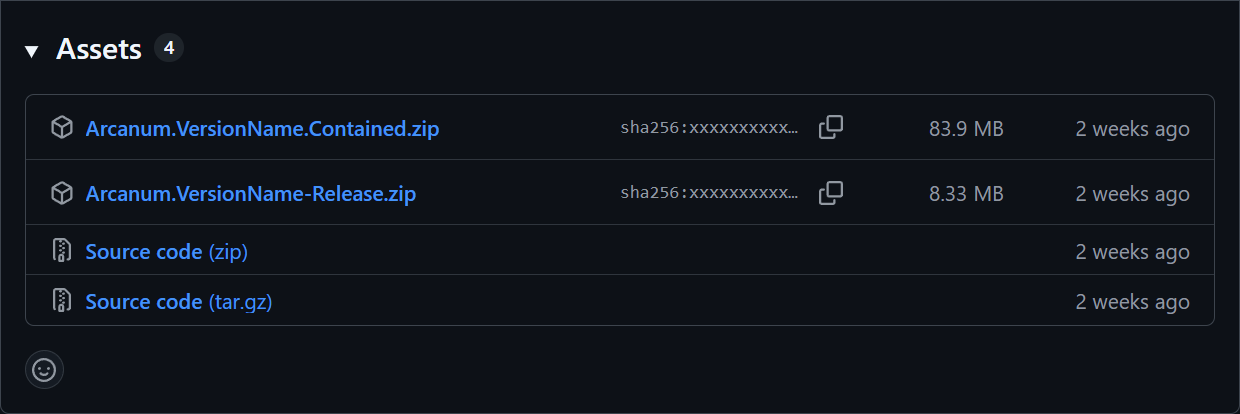
Choose the desired version of the Arcanum executable. (See below for details!)
Download the selected
Arcanum.zipversion and extract the exectuable file (.exe) from it.Place the executable in any folder of your choice (for example,
C:\Tools\Arcanum\).Double-click
Arcanum.exeto launch.
Choosing Release or Contained Versions
There are two types of executable releases available:
Release Version: This is the standard version that requires the .NET runtime to be installed on your system and is therefor smaller in size. Choose this if you already have the .NET runtime installed.
Contained Version: This version includes the .NET runtime bundled with it. It is larger in size but does not require any additional installations. Choose this if you prefer a self-contained setup.
This option is for those who want to build the project themselves.
Prerequisites
Installation from Source
Clone the Repository: Open a terminal/command prompt and run:
git clone https://github.com/The-Arcanum-Project/Arcanum.git cd ArcanumBuild the Project: Compile in Release mode:
dotnet build -c ReleaseLocate the Executable: After a successful build, the compiled executable will be in:
./bin/Release/net8.0/Arcanum.exeRun Arcanum: Execute the program with::
./bin/Release/net8.0/Arcanum.exe